

To Chairperson and Presenter for Presidential Lecture, Special Lecture, Meet the Professors, Sponsord Seminar, Luncheon Seminar
1. Presentation Time
According to the session.
2. Equipment and reception
PC presentation (1 screen) only.
To Chairperson and Presenters for Oral Presentations
1.Presentation time
Oral Presentation: 5min. Q&A: 2min. (7min.)
Please adhere to the schedule.
Presentation must be completely in English.
2. Equipment and reception
-Equipment
a. PC presentation (1 screen) only
b. no limits for number of slides, but please adhere to presentation time limits
c. no sound available
-Reception
Date and Time: February 27th (Fri) 7:40-18:30
February 28th (Sat) 8:30-10:30
Place: Preview Desk (In front of Ocean Hall)
a. All speakers must go to the preview Desk 30 min before presentations for checking of operations
b. If you wish to use your own PC, you must submit your PC to the operator at the meeting room for a connection check. Please pick up your PC shortly after the presentation.
3. Presentation Data
-If bringing data (Windows only)
a. Only use the following OS, applications, and movie files:
OS…Windows11
Applications…Power Point 2021 or later
Video files…playable with Windows Media Player (MP4 recommended)
*Macintosh power point is unsuitable
*Keynote is not available
b. In order to prevent abnormalities of balance of screen layout or garbled characters, please use OS standard font.
c. Only USB flash memory may be brought.
*Please do not have other data than that to be used for the presentation for the day.
d. If other data (pictures, animation, graphs, etc.) is linked to the presentation, backup all original
data and please check operations in advance with a PC other than the PC which had the data created.
e. Please input presentation number and speaker name into a file like the following example:
*O1-1 Taro Okinawa file → O1-1 Taro Okinawa.ppt
f. In order to prevent viral infections to the system in the hall, please be sure to perform virus
checking of media in advance using updated security software.
g. In the preview room, we have updated virus security, and although we have taken all possible
precautions, virus infection is always a possibility.
h. Presentation data will be saved to a server in to preview room, and responsibly deleted after the
meeting end.
-If bringing your own PC (Windows or Macintosh)
a. Please check your PC output terminal and bring the regular monitor terminal (HDMI) for connection to the monitor.
b. The resolution of the projector is Full HD (1920×1020 pixels). When a change of resolution is required,
please set up the resolution on the PC beforehand.
c. Even if animation / pictures are displayed correctly on the PC monitor, caution that external
output may not actually be carried out. Please be careful, if you create presentation data on a PC
which is not used for actual presentations.
d. Please cancel/adjust screen saver and a power-saving setups beforehand.
※ Macintosh users: Also turn off Hot Corner settings.
e. Please be sure to bring a PC adapter with you for each. If you use only battery it may run out during the presentation.
f. Please be sure to prepare a copy of backup data (a USB flash memory) just in case.
4. Proceedings
-Presenters
a. Please present under the direction of the chairperson.
b. Please use the designated seat in the front row in the room 15 minutes before the program
start.
c. An operator performs projection of presentation data during the presentation.
The presenter may operate a mouse / keyboard at the podium, using the projection (there is no
computer monitor at the podium)
-to Chairperson
a. Please take a seat in the meeting room in the front row 15 minutes before the session.
b. At the signal to start, please go to the front and start the session.
c. The chairperson is in charge of each of the sessions. Please adhere to the finishing times.
d. For the Q&A, the official language is English.
5. Q&A
If you have (a) question(s), please follow the chairperson’s direction and approach the
microphone in the meeting room. Please express your questions concisely after identifying your affiliation and your name.
COI disclose
Please disclose any conflicts of interest (COI) at the beginning of your presentation slides. Please refer to these guidelines for your reference.
Special precautions
Presentation slide should be written in English. We would like you, the presenter, to remain seated at the front of the room until the end of the session of your presentation in order to facilitate active discussions during the sessions. We would appreciate you for participating in the active discussion.
本学会では、Session内で英語による活発なご討議をいただくため、発表者の先生方には前方にお席を準備しております。ご発表のSession全体終了まではそちらにご着席の上、英語による活発な質疑をお願いします。
Wada Award
The Wada Award was established by Ms. Shuko Wada, wife of the first president, Dr. Juro Wada, who contributed to the establishment and development of PPSA-JC, and has been accepted since the 31st Congress(Taipei)for excellent presentations by young doctors.
Wada Award is open to those under 40 years of age who have applied in advance.
The announcement of the Wada Award winners and the awarding ceremony will take place on February 28th(Sat)at 11:15. Prease note that the award may be withdrawn if you are absent without notice.
Poster session presenters
1. Venue, set up , display, discussion and removal time
| Poster number | P1 | P2 | P3 | P4 | P5 |
| Venue | Ocean Hall | ||||
| Set up | February 27th (Fri) 11:30-16:00, 28th (Sat) 7:30-8:00 | ||||
| Presentation | 8:20-9:10 | 8:20-9:10 | 8:20-9:05 | 8:20-9:10 | 8:20-9:05 |
| Display | 9:10-10:00 | ||||
| Removal | 28th (Sat) 10:00-11:30 | ||||
2. Poster Exhibition Guidelines
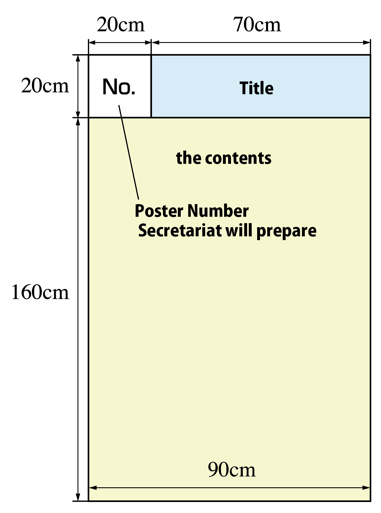
a. Please draw up all poster notice manuscripts in English.
b. The size of the poster panel is 180 cm by 90 cm.
c. A subject number (20 cm x 20 cm) is prepared by the secretariat, and is affixed on the upper left end of the poster board.
d. Please prepare subject title, including affiliation and author names to fit 20cm by 70cm, and the contents to fit 160 cm by 90 cm. (Refer to right figure)
e. Push pins will be prepared at the poster pannel by a secretariat.
The pasting should use pushpins and should be secured firmly.
※ Please, do not use tapes or nails.
3. Poster Discussion
a. The presenter needs to stand by in front of his/her poster during discussion times.
b. Poster Presentation: 4min. Q&A: 3min. (7min.)
4. Poster removal
a. Please be sure to remove everything.
b. We will dispose of all posters and related leftovers after an appointed time.
5. Change of subject name and/or presenter
Change of subject is not permitted.
If withdrawal or presenter change arises, please contact the secretariat promptly.
Contact us
| Secretariat | Department of Surgery, School of Medicine, Iwate Medical University Tel: +81-19-613-7111 |
|---|---|
| Congress Secretariat | c/o Yamada Planning Co., Ltd. 1-5-5 Kitaiioka, Morioka, Iwate 020-0857 Japan Tel : +81-19-635-6011 E-mail : ppsa-jc39@yamada-planning.co.jp |